
Migrating from Page Builder
If your CMS pages currently use Magento Page Builder, you can import that content into Breeze Content Builder with a single click.
How to Migrate a Page
- Open Breeze Theme Editor and go to the Content Builder tab.
- Select the CMS page you want to migrate.
- If Content Builder is not yet enabled for this page, enable it first (or use the Import from Page Builder shortcut shown on the empty state screen).
- Open the panel menu (three-dot icon) and click Import from Page Builder.
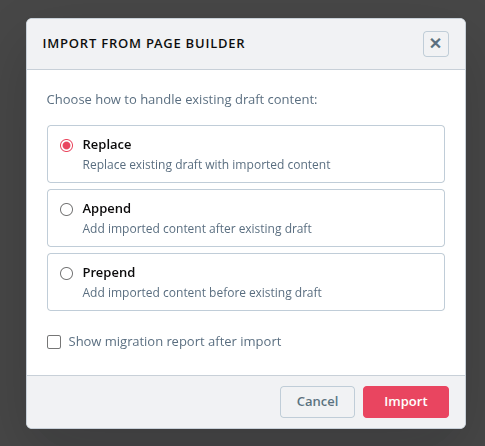
- Choose an import mode:
- Replace — replace the current draft with the imported content
- Append — add imported content after existing content
- Prepend — add imported content before existing content
- Optionally enable Show migration report to review what was converted.
- Click Import.
Migration Report
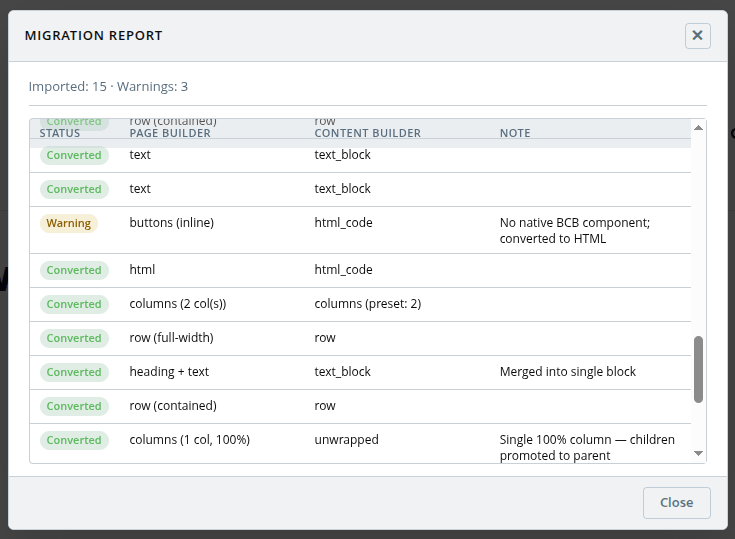
After import, if you enabled the report, a summary dialog shows the result for each component — whether it was converted, had warnings, or was skipped.
What Gets Converted
| Page Builder component | Result |
|---|---|
| Row | Row (contained or full-width) |
| Column group | Columns (50/50, 33/33/33, 25×4, 33/66, 66/33 — matched automatically) |
| Heading | Text block |
| Text | Text block |
| Heading + Text (adjacent) | Merged into a single Text block |
| Divider | Divider |
| HTML Code | HTML block |
| Image | Image |
| Banner | Banner (overlay layout) |
| Tabs | Tabs |
| Slider | EasySlide widget (if EasySlide is installed), otherwise static HTML |
| Buttons | HTML block |
| CMS Static Block | Widget |
| Products | Product grid |
| Video | Skipped |
| Map | Skipped |
Known Limitations
- Buttons: there is no native button group component — output is raw HTML.
- Slider: slide appearance and mobile images are not mapped when converting to EasySlide.
- Widget-type links (category, product, or page links stored as
{{widget}}directives in Page Builder) are dropped with a warning. Convert them to plain URL links in Page Builder before migrating. - Banner: image alt text is not available in Page Builder banners and will be empty after migration.