
Creating email gateway
If you commonly use Mandrill App or other mail services for sending emails, please go to the next item. If not and you want to create third-party mail gateway, please go Magento Admin > Templates Master > Newsletter Booster > Email Gateway.
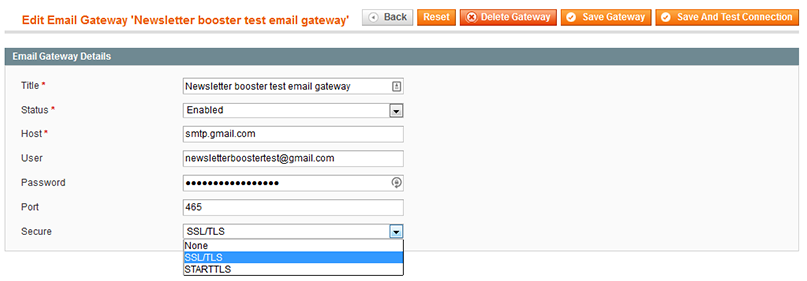
Title- specify the name of new gateway.Status- select Yes to enable current gateway.Host- enter the name of your mail server.User- specify user’s name or email address for authorization.Password- enter the user’s password. Please notice that this field is not required. An anonymous email gateway can be also created.Port- specify the port, that will be used to access your mail server.- Select types of secure from drop-down list. Possible values are None, SSL\TLS and STARTTLS.